Introduction
PostgreSQL is one of the (if not the most) advanced open source databases. It combines relational and document based structures very conveniently with each other. Moreover, the powerful features it is distributed it is highly extensible. Such an extension is the popular PostGIS extension, which enables geographical calculations, topological alteration and more, with high performance.
If it comes to code maturity and maintenance, PSQL has been around for a while, and is not going anywhere soon [1]. It is flexible, fast and has a decent documentation.
Anyway, if you hear now for the first time about PostgreSQL, databases and such. Here are some links to start with. But you can feel free and Google for better ones or look around in your local library for some offline knowledge. But I emphasise that you should not get scared from these links, they are here for the ones thirsty enough for deeper understanding, if you simply want to integrate rivus_db into rivus, you can also get along with some clicks and commands and get your system up and running.
- Stanford class for university styled jump-start.
- Video jump-start for those who prefer that kind of learning.
- PostgreSQL specific tour, you can jump through the too detailed sections.
- In depth understanding for those how need to know it all, before they can get started.
If you need some inspiration to take a step away from the spreadsheet and CSV dominated data handling, refresh your frustrating memories with the European Spreadsheet Risks Interest Group.
| [1] | Developed since 1989. Since years it has been in the top 5 most popular databases. DB-ENGINE |
Get PostgreSQL
With Admin / root
My favoured way to install PostgreSQL locally is the excellent distribution of BigSQL. You can get multi-platform installers and click through the installation and get ‘Start PostgreSQL` integration into your Windows Start Menu. things. This is convenient and especially likeable for Windows users. However, you will need admin privileges. (A similar alternative is offered by EDB which has a nice ‘Stack Builder’ solution for managing extensions.)
Without Admin / root
- Get the multi-platform Postgres Package Manager by BigSQL.
- Follow the instructions on that page. (Less than 5 commands...)
After you are ready, you can source the .env file (or execute /BigSQL/pgX.x/pgX.x-env.bat .) So the pgc and psql commands get available globally.
If you did things right you can see the status, start, stop and more with:
pgc status
pgc start
pgc stop
Adding PostGIS for geographical support
Regardless of how you installed the database, if you want to have geographical support
to your data. (Which we usually want with rivus.) You can go ahead and add it to your BigSQL installation with their pretty good command line tool:
::
pgc install postgis23-pg96
Create your database
From scratch
I like to create the basis of my database schema visually. I use the multi-platform proprietary but freely and unrestrictedly evaluable StarUML2 with its nice PSQL plug-in which can generate PostgreSQL flavoured SQL code for the created diagram.
The plug-in has some own syntax, but all in all, generates good basis.
Such generated scripts can be found in /rivus_db/sql/staruml_export/
After that you can change them if needed and execute them as described in PSQL plug-in file deployment.
From included scripts
If you want to simply recreate my used schema. You can find a bash script /rivus_db/sql/create_from_staruml.sh which is also executable under Windows with e.g. Git Bash.
See Reference for more details.
This script modifies the generated PSQL scripts and also create a database where:
- prerequisites
- server is running on localhost and the database super-user is postgres
- database
- will be called rivus
- extension
- PostGIS will be created.
Connect to PostgreSQL Server
Bare bones
psql ships with PostgreSQL. With it you can connect to your server and manage it or query the databases.
Let’s see an example:
psql -h localhost -U postgres rivus
=#\dl
=#...
With the previous commands you connected to the locally running database called rivus, as the database user postgres.
With \dl we list all the relations in the DB.
We can also run a simple query:
=#SELECT * FROM run LIMIT 10;
This query can also span to multiple lines. The query will be executed if you hit return after the closing semi-colon.
=#SELECT *
-#FROM run
-#WHERE start_ts > '2017-08-08 12:00:00';
Graphical UI
If you learn how to use psql from the command line you will gain some useful skills on the long run. However, you can use some graphical user interface to ease the learning curve or reuse queries.
Besides the numerous proprietary tools, DBeaver is a nice free tool to help you get along with the databases. The only drawback is that it is not available as portable from the official website, so you will either need the proper privileges to install this piece of software from the official source or trust a packaging website like this. Among many useful features, the full-fledged SQL editor with autocompletion, the graphical query tool, the grid-like data-view and the possibility to access remote DBs through SSH are especially nice features to have.
Note
There is a free academic license for the Enterprise Edition!
There is also a 50% discount code for EE with this code if you are not an academic, but want to use EE.
Under rivus.schemas.tables one can have a “spreadsheet like” view into the data. Moreover, you also get a diagram depiction of the relations.
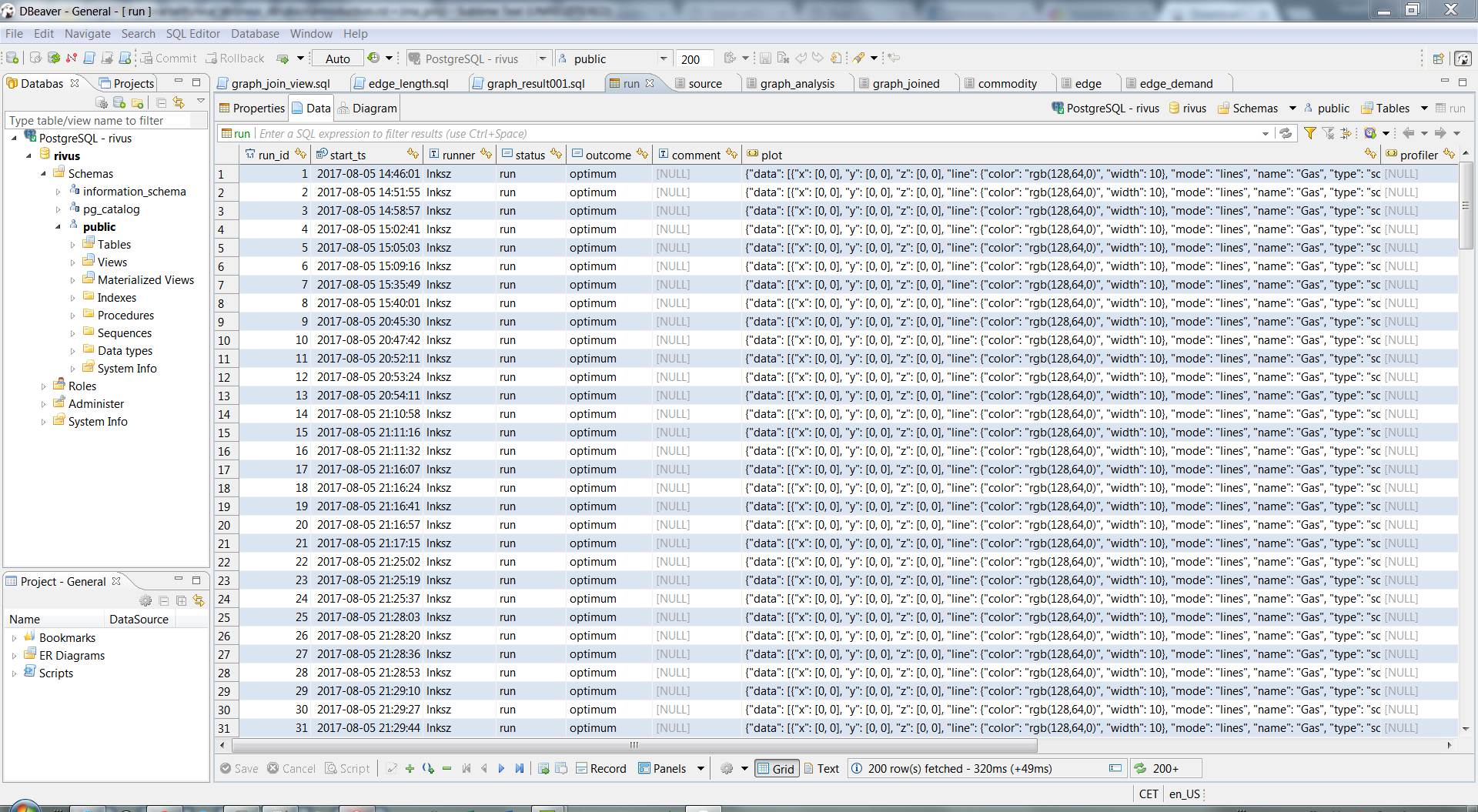
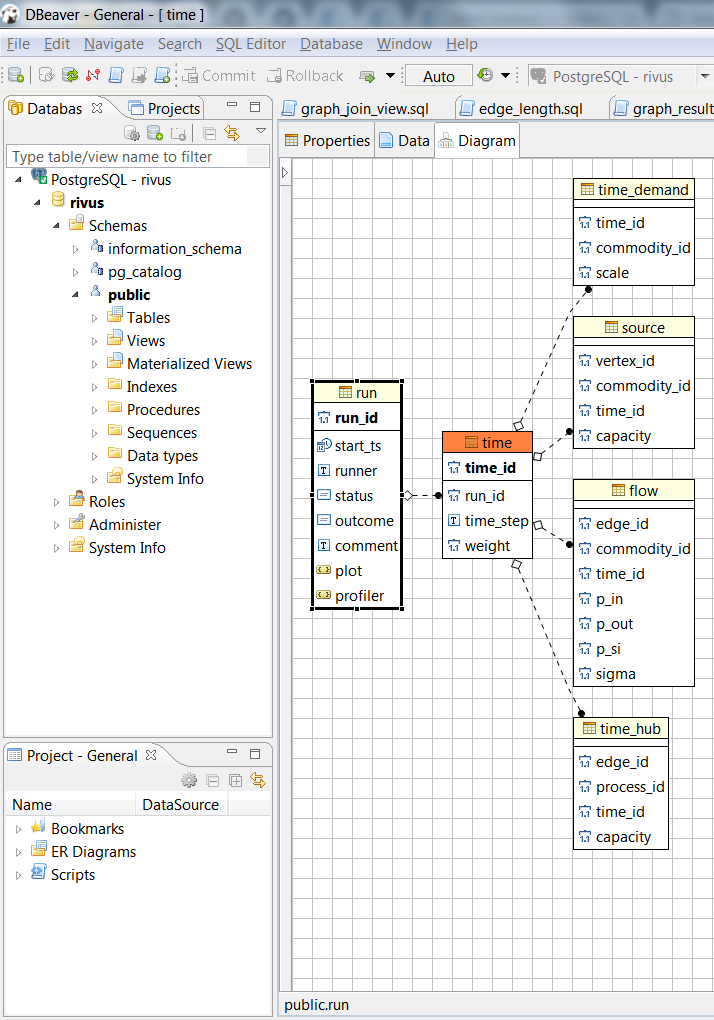
With syntax highlighted SQL queries the pioneering and middle level data analysis is made easier.
Note
You can even connect to a server’s running database service through an SSH tunnel.
This is only an extra minute to spend in the - New Connection - set-up of DBeaver, but gives you graphical interface to remote information stored on a server database.
Integration with rivus
If you finished all the previous steps, then it is worth mentioning, that on the rivus side, the sub-package rivus.io.db holds the functions to interact with the database.
1 2 3 4 5 6 7 | from sqlalchemy import create_engine
from rivus.io import db as rdb
engine = create_engine('postgresql://postgres:pass@localhost/rivus')
# ...
# Modelling, Solving, Analysing
# ...
rdb.store(engine, rivus_model, run_data=run_dict)
|
- Import sqlalchemy for managing the connection to the database.
- Import the db sub-package.
- Tell sqlalchemy, how it can reach the database. You can recognise the parameters from database-parameters
- Call a self-written, high-level function to store the model related data (inputs and results) into the database schema.
For more details see the corresponding section of the rivus documentation.